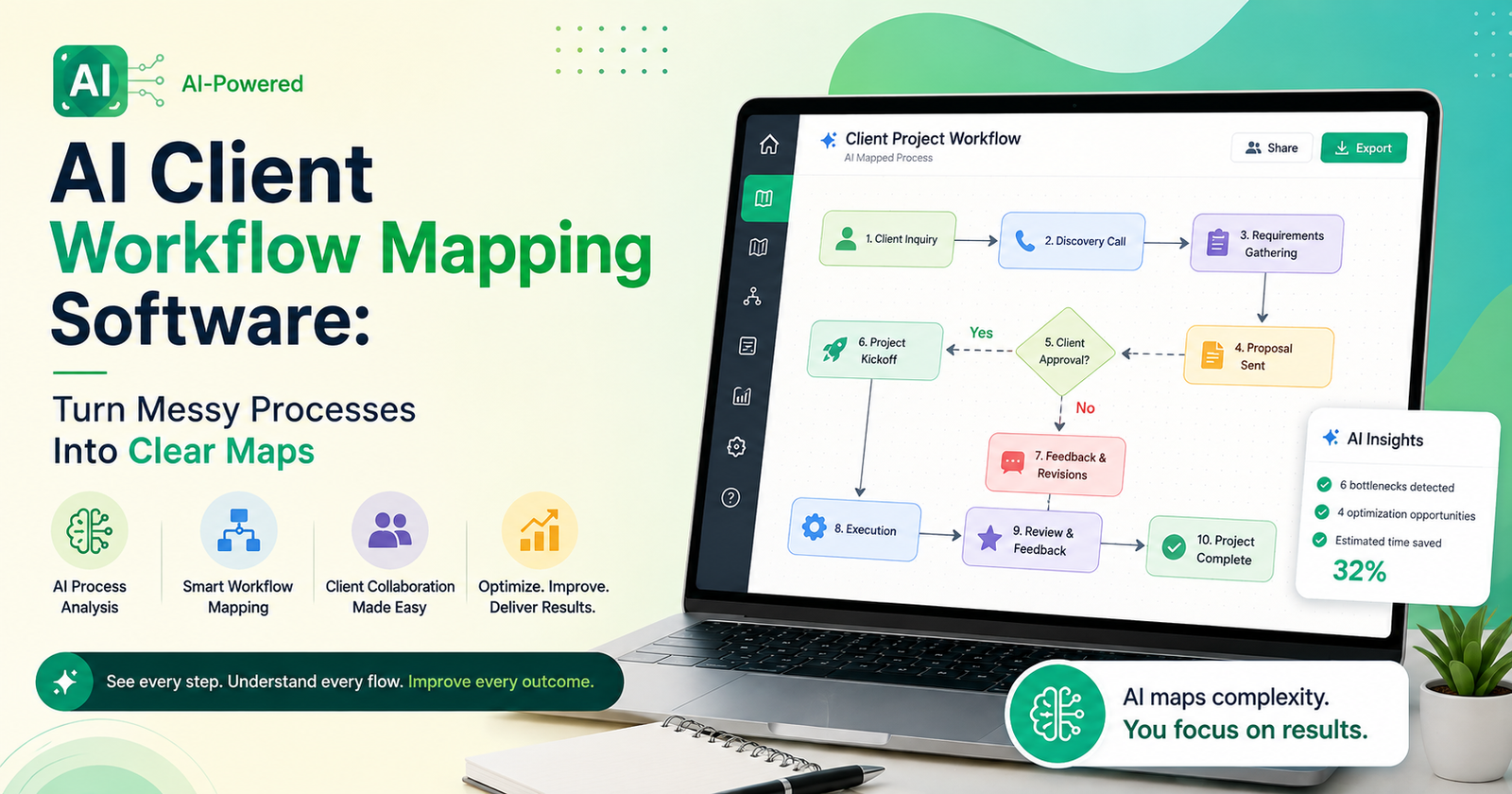

Ask an agency owner how client work actually flows through their team and watch what happens. There’s a pause. Maybe a laugh. Then something like “it depends on the client, honestly” — which is another way of saying nobody actually wrote it down, and the process lives entirely in three people’s heads, none of whom are ever in the same meeting at the same time. I’ve worked at places like this. Onboarding looked different every single time, approvals vanished into email threads that got buried under fifty other emails, and new hires just… absorbed the process by osmosis, badly, over a couple of stressful months.
AI client workflow mapping software exists because that situation is common and it’s genuinely costly, even if nobody puts a dollar figure on it until something goes wrong.
What It’s Actually Doing Under the Hood
Strip away the marketing language and the core idea is simple: take the steps a client goes through, from the first call to final delivery, and lay them out so a human can actually see them. The “AI” part isn’t there to be flashy. It’s there because:
- it can watch how work moves through the team in reality and build a map from that, instead of from someone’s optimistic memory
- it notices when the same step keeps eating three extra days — client approvals, usually, in my experience
- it flags where a manual task is quietly wasting someone’s whole afternoon and could be automated instead
- The map keeps updating itself as the process shifts, so it doesn’t turn into that outdated whiteboard diagram nobody trusts anymore
Why the Whiteboard Version Never Survives
Nearly every team has tried this the old way at some point. Slow week, good intentions, someone grabs a marker. And it works, for about six weeks. Then a new client type shows up that doesn’t fit the diagram, someone quits, a tool gets swapped, and suddenly that whiteboard is just decoration. Nobody has the bandwidth to redraw it, so it sits there being wrong while everyone quietly ignores it.
Software that keeps the map current on its own sidesteps that whole cycle. It grows with the business instead of freezing the moment it’s drawn.
Where It Actually Hurts Most
Onboarding, internal handoffs, and approval loops — that’s where I’ve seen the real friction pile up, over and over, at different companies. Multiple people, each assuming someone else has the next step handled. That assumption is where things fall through.
Features Worth Actually Caring About
Not all of these tools are built the same, not even close.
Keep the Diagram Clean
If it takes ten minutes just to understand the map, the whole point is defeated. Good tools stay simple by default and let you zoom into detail only when you actually need it.
Someone Owns Every Step
A map without clear ownership is just a nicer-looking version of the same confusion. Every box needs a name attached, or it’s decoration again.
Real Bottleneck Detection
This is where the AI earns its keep, honestly — instead of you eventually noticing that approvals always drag, the tool flags it from actual timestamps, and you’ve got somewhere concrete to start.
Plays Nice With What You Already Use
A mapping tool that doesn’t talk to your project management software forces double entry, and double entry means it’s out of date within a month. Guaranteed.
Getting Something Real Out of It
Buying it is the easy part. Teams that get value out of these tools actually pull the map up during meetings, update it the moment a client type changes, and treat the bottleneck data as an input into real decisions — not a report that gets glanced at once and forgotten in a drive somewhere.
Final Thoughts
Client work rarely falls apart because people didn’t care. AI client workflow mapping software gives teams that missing picture back, and keeps it accurate while the business keeps changing underneath it. For anyone juggling more than a handful of clients at once, that clarity turns into one of the more quietly valuable things in the whole stack.


[…] real test isn’t the demo; it’s whether your crew actually believes the tool will hold up during a real job with dead […]
[…] doesn’t mean stripped-down or limited, not really. It means the thing is built around speed and clarity first, instead of trying to be […]
[…] question — how does a tiny device with limited processing power run AI that’s normally associated with massive server farms? Comes down to model […]
[…] go further, building their own solar arrays right on-site, on rooftops or adjacent land, to supplement what’s coming off the grid. Battery storage is increasingly […]