
I’ve once watched a coworker spend 40 minutes looking for a single PDF. Forty minutes. It was a vendor contract from two years back, and it existed, somewhere, in a shared drive that had basically become a landfill. She finally found it by asking three different people if they remembered who’d sent it. That’s not really a technology problem. It’s an organization problem.
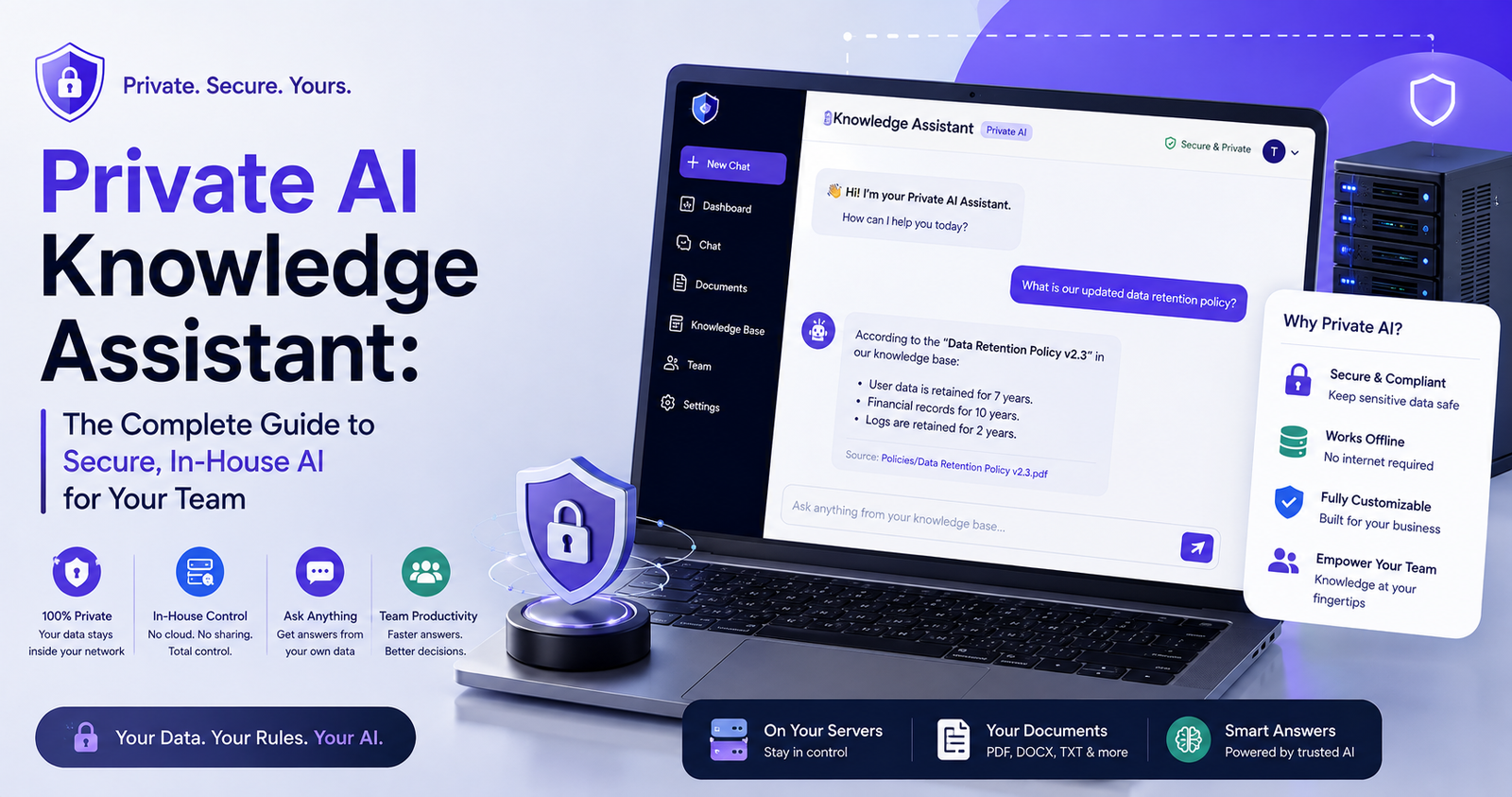
So what is it. Not ChatGPT. Not some public chatbot you paste company info into and hope for the best. A private AI knowledge assistant is closed off — trained on or connected only to your own company’s stuff. Your contracts, your Slack history if you want, your policy docs, your product specs. Nothing you type trains some external model somewhere. The whole point is convenience without giving up control of your own data.
I want to walk through what this actually is, why it’s spreading fast right now, how it works mechanically, and what to actually look for if you’re the one deciding whether to build one or buy one.
What It Actually Is
Think of it as a search-and-conversation layer sitting atop everything your company already has. Instead of digging through folders or asking around as my coworker did, you just ask the assistant. It goes and finds the answer in your actual documents — old contracts, internal wikis, HR stuff, support tickets, meeting notes, whatever you’ve connected — and gives you something usable back.
The “private” word does a lot of work here, more than people give it credit for. Public tools process what you type on someone else’s servers. Depending on the provider, that might get logged, stored, who knows what else. For a law firm, a clinic, an engineering team with proprietary designs — that’s just not acceptable.
Why Companies Are Actually Doing This
Here’s the pattern I keep seeing. Employees start using public AI chatbots on their own — nobody approved it; it just happens because it’s useful. Then IT notices client names and financial numbers getting pasted into a tool that has no accountability for where that data ends up. People call this “shadow AI,” and it’s become a real headache for security teams, not a hypothetical one.
Banning it outright doesn’t really work. People just keep doing it quietly, and now you’ve lost visibility entirely, which is worse. So the smarter move companies are making is giving employees an approved private version that does the same job. Not about restricting AI. About controlling where the data goes.
There’s a second reason too, separate from security. A generic chatbot has no idea what your refund policy says or what your product roadmap looks like. It’ll write you a nice email, but it can’t tell you anything specific about your own business, because it doesn’t know your business. A private assistant does, because — obviously — it’s plugged directly into that information.
The Mechanics, Roughly
Most of these run on something called retrieval-augmented generation. RAG, everyone shortens it to. Two steps, basically.
Step one: when a document gets added, whether it’s a PDF or a Notion page or whatever, it gets chopped into smaller pieces and turned into embeddings — a mathematical fingerprint, more or less, that captures what the text actually means. Those get stored in a specialized database built for fast similarity lookups.
Step two, when someone asks a question, that question also gets turned into an embedding, and the system searches for the closest matching chunks. Those chunks get handed to a language model along with the original question, and the model writes an answer grounded in what it actually retrieved — often citing exactly where the info came from so you can double-check it if you need to.
Why does this matter over just training a model on everything upfront? Because you don’t have to retrain constantly. Documents change, policies get updated; you just update the knowledge base and the next question automatically reflects it. No retraining cycle. Some setups go a step further too and connect live to internal tools — CRMs, ticketing systems — so answers can pull real-time data, not just static files sitting around.
The Pieces That Make It Work
If you’re evaluating or building one of these, it usually breaks into five layers. Data ingestion — pulling content in from wherever it lives, cloud storage, email, wikis. Embedding and indexing — organizing all that so it’s searchable fast. Retrieval — actually finding the right chunks for a given question. The language model itself, turning retrieved info into something readable. And then permissions, which honestly gets overlooked constantly and shouldn’t be.
That last one is the one I’d worry about most if I were setting this up. A properly built assistant respects whatever access controls already exist. If someone in marketing doesn’t have clearance to see a particular HR file, the assistant shouldn’t surface it just because it technically got indexed somewhere. Get this wrong and you’ve basically built a workaround for your own security policies, which defeats half the point.
Where People Are Actually Using This
Support teams pull up the right troubleshooting steps instantly instead of digging through a help center that’s three versions out of date. New hires ask about benefits or tools without pinging their manager for the tenth time that week — genuinely useful, that one; managers love it. Legal teams search old contracts for a specific clause in seconds instead of an afternoon. Engineers ask how some internal system actually works instead of tracking down whoever built it two years ago and probably left the company since. Sales pulls up pricing history or old client notes without digging through a CRM that nobody updates consistently.
None of this is because the AI is “smart” in some abstract sense. It’s because it has access to the right information and can get to it faster than a person doing it manually. That’s really the whole value proposition, stripped down.
Security, Because You Have To Think About It
Given how much sensitive material passes through one of these, security can’t be an afterthought — has to be baked in from day one. Encryption at rest and in transit, obviously. Role-based access that actually mirrors your existing permission structure, so the assistant isn’t quietly becoming a backdoor around the rules you already have. Audit logging matters a lot too, especially in compliance-heavy industries — you need a record of who asked what and what came back.
For regulated fields, healthcare, finance, and government work, the deployment model itself becomes a real sticking point. Some organizations need everything running on infrastructure they physically control. Doesn’t matter how strong a vendor’s privacy promises look on paper — some compliance requirements just won’t allow third-party cloud, full stop.
Before signing with any vendor, ask directly: where does processing happen, is anything logged or retained anywhere, does our data ever get used to improve models for other customers, and what happens to everything if we cancel.
Build It Yourself or Buy It
Three general paths here. Build entirely in-house with open-source models and open-source vector databases — max control, but you need real engineering time to keep it running. Or use a managed enterprise platform that bundles retrieval, permissions, and the model together — faster to launch, less flexible, and there’s a subscription. Or a hybrid: enterprise API under a strict no-training agreement, but you build the retrieval and permissions layer yourself.
Smaller companies without dedicated engineering usually go managed. Bigger orgs with compliance requirements and actual dev teams tend to lean hybrid or fully in-house, because they want direct control over exactly where the data sits and how it moves.
Mistakes I’d Watch Out For
Biggest one, by far: connecting everything on day one before thinking through permissions. Feels efficient, actually just creates a mess where people see stuff they shouldn’t, and once that happens once, trust in the whole tool tanks immediately. Hard to walk back.
Second mistake — treating this like a one-time project. Set it up, walk away, done. Except knowledge bases go stale fast. Documents get outdated, nobody’s updating the source material, and six months later the assistant is confidently giving wrong answers because nobody assigned ownership of keeping it current.
Third, and this one’s smaller but still trips people up — skipping training entirely. Even a genuinely well-built assistant needs people to understand what it’s good at and how to phrase a question to get a useful answer out of it. A short session, even just a one-page internal guide, makes a noticeable difference in how much people actually end up using the thing.
How I’d Start
Small. Pick one department, one specific use case — support, onboarding, engineering docs, whatever’s most obviously painful right now — and connect a limited, well-organized set of documents first. Makes it way easier to test permissions properly and see if the answers are actually accurate before you’re dealing with the whole company’s data at once.
From there, expand gradually. Review each new data source for sensitivity before adding it, don’t just dump everything in because you technically can. Companies that go slow here end up with much better long-term adoption than the ones that try to connect their entire filing system in week one and then wonder why employees stopped trusting it by month two.
Where This Leaves Us
A private AI knowledge assistant changes something pretty basic about how a company relates to its own information. Instead of stuff scattered across drives and half-remembered by whoever happened to write it, it becomes something you can actually ask a question and get an answer from — without any of it leaving the building, so to speak. As people get more wary of pasting sensitive stuff into public tools, and honestly they should be, this kind of permission-aware, private setup is turning into a pretty standard part of how teams operate rather than some cutting-edge experiment.
The companies getting the most out of it, from what I’ve seen, aren’t necessarily running the fanciest tech. They’re the ones who bothered to organize their data properly, respected the access rules they already had in place, and treated the whole thing as something that needs ongoing care — not a box to check once and forget about.


[…] guy who runs a small hardware store near where I used to live told me his internet drops out at least once a week. Not for long, twenty minutes maybe, but long enough […]
[…] the actual mechanics behind digital habits doesn’t automatically fix anything on its own. Understanding a pattern intellectually and actually changing it day to day are […]
[…] shocking number of people, according to various surveys over the years, believe humans and dinosaurs coexisted at some point. Likely influenced more […]